Vector vs. Bitmap: Choosing the Right Image Format for Print
No one wants a blurry, pixelated print. To get professional results for your custom stickers, you need to understand the two main categories of digital images: Bitmap (also called Raster) and Vector.
The file format you choose determines how your artwork handles resizing. Choosing the wrong one can lead to fuzzy custom stickers or distorted logos. We explain the technical differences so your next project comes out crisp and clear.
What are Bitmap Images?
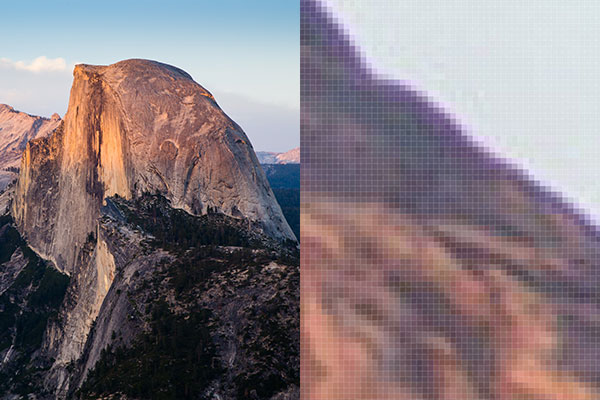
Bitmap images are the most common digital files. They’re made up of a fixed grid of tiny colored squares called pixels. Because bitmaps have a set number of pixels, they lose quality if you try to stretch them. This is why a small photo from your phone might look great on your screen but pixelated when printed on a large window decal.
Best for: Detailed photographs and complex shading
Common file types: .jpg, .png, .gif, .tiff, .psd
If you're using a bitmap for custom labels, ensure the resolution is at least 300 DPI (dots per inch) at the size you want it printed.
What are Vector Graphics?
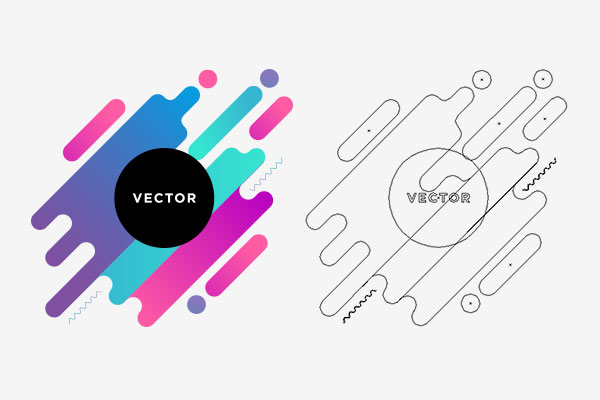
Vector graphics don’t rely on pixels. Instead, they use mathematical equations to create points, lines and curves. Because the computer calculates the image based on math rather than a fixed grid, you can scale a vector image to the size of a billboard or shrink it down for a temporary tattoo without losing any clarity.
Vectors are the industry standard for professional branding because they stay perfectly sharp regardless of the dimensions.
Best for: Logos, typography, illustrations and custom patches
Common file types: .ai, .eps, .svg, .pdf (if saved correctly from a vector program)
File sizes are usually much smaller than bitmaps because the computer only stores the mathematical instructions rather than millions of individual pixels.
Which Should You Use?
Choosing between the two depends on the complexity of your artwork and how you plan to use it.
Scaling Needs
Use a vector if you need the same logo for a tiny laptop sticker and a massive wall decal. It will be consistent across every size.
Visual Detail
Use a bitmap if your design features a realistic photo of a sunset or a person. Vectors struggle to recreate the subtle color transitions found in photography.
Production Speed
Bitmaps are easier to create and share quickly, while vectors require specialized software like Adobe Illustrator or Inkscape.
How We Handles Your Files
While we always recommend uploading a vector file for logos and text to ensure the sharpest possible print, we know that isn't always an option. Our system is designed to handle both formats.
If you upload a bitmap image, our tools help you see if the resolution is high enough for your selected size. If you’re looking for a perfectly clean cut-line around your design — especially for die-cut stickers — a vector file makes the process seamless.
When in doubt, remember that photos are Bitmaps and logos are Vectors. Using the right format from the start saves time and ensures your branding looks professional.
Ready to start designing? Upload your file to our editor and start creating today.